
Every API page shows its examples as curl commands. Paste one into Windows PowerShell 5.1 and it fails with an error about Headers or a missing parameter, even though Windows 10 and 11 ship the real curl.exe. The reason is an alias: in Windows PowerShell, curl runs Invoke-WebRequest. This page shows how to call the real curl from any shell, how to send JSON without PowerShell eating the quotes, and how to write the same call with Invoke-RestMethod.
This guide at a glance
Who it's for
Admins calling APIs
You copy curl commands from vendor docs into PowerShell or CMD.
What you get
Working calls in every shell
The real curl.exe, a safe way to send JSON, and the Invoke-RestMethod version.
The trap
curl is an alias
In Windows PowerShell 5.1, curl means Invoke-WebRequest, with different parameters.
Have a curl command already? Paste it into the cURL converter to get the Invoke-RestMethod version.
Quick answer
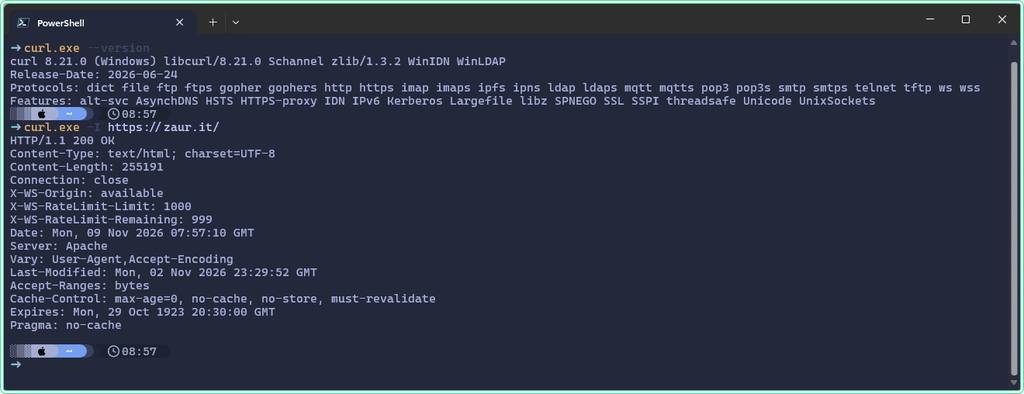
Type curl.exe instead of curl. The .exe skips the alias in every PowerShell version and changes nothing in CMD. Run this in any PowerShell window, no elevation needed:
# .exe forces the real curl, never the Invoke-WebRequest alias
curl.exe --version

# -I sends a HEAD request: status line and headers only, no page body
curl.exe -I https://zaur.it/
The first command prints the curl version and the list of protocols it supports. The second prints HTTP/1.1 200 OK (or HTTP/2 200) followed by the response headers.
What curl means in each shell
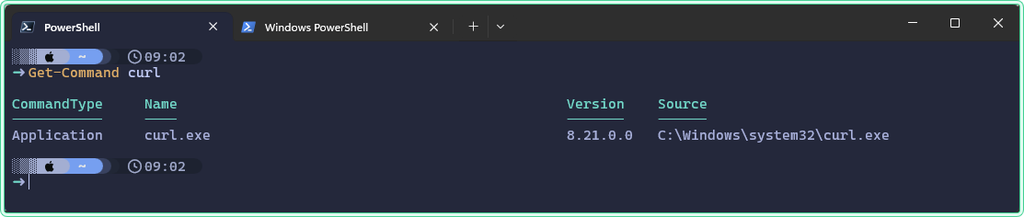
The same word runs three different things depending on where you type it. Get-Command tells you which one you get:
Get-Command curlIn Windows PowerShell 5.1 the answer is an alias:
CommandType     Name                                               Version    Source
-----------     ----                                               -------    ------
Alias           curl -> Invoke-WebRequest
In PowerShell 7 the same command shows Application and the path C:\Windows\system32\curl.exe, because PowerShell 7 dropped the alias.
| Where you type curl | What runs | Paste curl examples as is? |
|---|---|---|
| CMD | C:\Windows\System32\curl.exe | Yes, but change single quotes to double quotes |
| Windows PowerShell 5.1 | Invoke-WebRequest (alias) | No: use curl.exe |
| PowerShell 7.x | curl.exe | Yes for simple calls; JSON quoting works from 7.3 |
curl.exe --version.
Practical examples
Each example runs in Windows PowerShell 5.1 as a normal user, from any folder. The test endpoint https://httpbin.org echoes back what you send, so you can see exactly what reached the server. Your workstation needs internet access.
1. The error you get when you paste a curl command
The problem: you paste an example from API docs and PowerShell refuses it before anything is sent.
The solution: read the error as a sign that the alias ran, and add .exe.
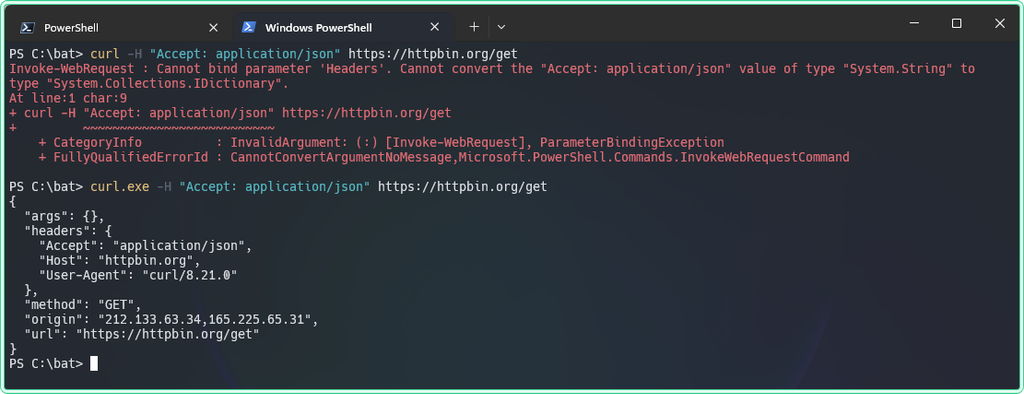
# Fails in Windows PowerShell 5.1: -H is read as Invoke-WebRequest -Headers
curl -H "Accept: application/json" https://httpbin.org/get
Invoke-WebRequest : Cannot bind parameter 'Headers'. Cannot convert the "Accept: application/json" value of type
"System.String" to type "System.Collections.IDictionary".While same command produces JSON output normally in PowerShell 7:
curl -H "Accept: application/json" https://httpbin.org/get
{
  "args": {},
  "headers": {
    "Accept": "application/json",
    "Host": "httpbin.org",
    "User-Agent": "curl/8.21.0"
  },
  "method": "GET",
  "origin": "212.133.63.34,165.225.65.31",
  "url": "https://httpbin.org/get"
}
-H is a valid short form of -Headers, which expects a hashtable, not a string. Other flags fail in other ways: -X gives A parameter cannot be found that matches parameter name 'X'. The fix is the same for all of them:
# Same command, real curl: the JSON echo from httpbin comes back
curl.exe -H "Accept: application/json" https://httpbin.org/get
You should see a JSON document with a headers section that contains "Accept": "application/json".
2. Send JSON without losing the quotes
The problem: the vendor example sends a JSON body with -d '{"name":"SRV-APP-01"}'. With curl.exe in Windows PowerShell 5.1 the server answers 400 Bad Request or invalid JSON.
The solution: put the body in a file and let curl read the file. Windows PowerShell 5.1 strips the inner double quotes when it starts a native program, so the server receives {name:SRV-APP-01}. A file is never touched by PowerShell parsing.
First see the damage. httpbin shows the raw body in data and the parsed JSON in json:
# Broken in 5.1: PowerShell removes the inner double quotes before curl.exe sees them
curl.exe -X POST -H "Content-Type: application/json" -d '{"name":"SRV-APP-01","role":"web"}' https://httpbin.org/post
In the reply, "data" is {name:SRV-APP-01,role:web} and "json" is null: the server did not get valid JSON. Now write the body to a file. The folder C:\bat\test is created if it does not exist:
New-Item -Path 'C:\bat\test' -ItemType Directory -Force | Out-Null

# -Encoding ascii: Windows PowerShell 5.1 would add a UTF-8 BOM with -Encoding utf8,
# and some APIs reject a body that starts with a BOM
Set-Content -Path 'C:\bat\test\body.json' -Value '{"name":"SRV-APP-01","role":"web"}' -Encoding ascii

# --data-binary "@file" sends the file byte for byte
curl.exe -X POST -H "Content-Type: application/json" --data-binary "@C:\bat\test\body.json" https://httpbin.org/post
This time "json" in the reply holds "name": "SRV-APP-01" and "role": "web".
-d '{...}' also works, because native argument passing was fixed.
Clean up when you are done:
Remove-Item -Path 'C:\bat\test\body.json'3. The same call with Invoke-RestMethod
The problem: you want the answer as an object you can filter, not as text on the screen.
The solution: build the body as a hashtable and let Invoke-RestMethod send it and parse the reply.
# A hashtable avoids all quoting problems; ConvertTo-Json writes valid JSON
$body = @{ name = 'SRV-APP-01'; role = 'web' } | ConvertTo-Json

$r = Invoke-RestMethod -Uri 'https://httpbin.org/post' -Method Post -ContentType 'application/json' -Body $body

# The reply is already an object: no ConvertFrom-Json needed
$r.json
name role
---- ----
SRV-APP-01 webHeaders go in a hashtable too: -Headers @{ Authorization = "Bearer $token" }. The cURL converter does this translation for you, including -X, -H and -d.
| curl.exe | Invoke-RestMethod / Invoke-WebRequest |
|---|---|
-X POST | -Method Post |
-H "Accept: application/json" | -Headers @{ Accept = 'application/json' } |
-d @body.json | -Body (Get-Content .\body.json -Raw) |
-o file.zip | Invoke-WebRequest -OutFile file.zip |
-k | -SkipCertificateCheck (PowerShell 7 only) |
-I | Invoke-WebRequest -Method Head |
4. Check a status code in a script
The problem: a monitoring script calls a URL with curl.exe and reports success, but the page returned 404.
The solution: curl exits with 0 whenever it got any HTTP answer. Ask it for the code, or add -f so an HTTP error becomes a non-zero exit code.
# -s silent, -o NUL throws the body away, -w prints only the status code
curl.exe -s -o NUL -w "%{http_code}" https://zaur.it/no-such-page/

# -f (--fail) turns HTTP 400 and above into exit code 22
curl.exe -s -f -o NUL https://zaur.it/no-such-page/
$LASTEXITCODE
404
22Invoke-RestMethod does the opposite: it throws an error on 404 and 500. Wrap it in try / catch in scripts, or the script stops at the first failed URL.
Hidden gems
- Remove the alias for good in 5.1. Add
Remove-Item Alias:curl -ErrorAction SilentlyContinueto your profile (notepad $PROFILE) and plaincurlruns curl.exe. To undo, delete that line and open a new window. On shared servers, prefer typingcurl.exe: scripts written there may expect the alias. - CRYPT_E_NO_REVOCATION_CHECK behind a proxy. curl.exe on Windows uses the Windows TLS stack (Schannel), which checks certificate revocation. If the proxy blocks the revocation servers, curl fails with this error.
--ssl-no-revokeskips only the revocation check, not certificate validation. - Invoke-WebRequest on a fresh server. In Windows PowerShell 5.1,
Invoke-WebRequestwithout-UseBasicParsingcan fail withThe response content cannot be parsed because the Internet Explorer engine is not available. Add-UseBasicParsingor useInvoke-RestMethod. - CMD quoting. In CMD, single quotes are not quote characters. Write JSON as
-d "{\"name\":\"SRV-APP-01\"}"or, simpler, use the--data-binary "@file"method from example 2.
Tips and limitations
- PowerShell 7 has no
curlalias, butwgetandcurlscripts written for 5.1 that relied on the alias break there. Search old scripts forcurlbefore you upgrade. - A token in a curl command line is visible in the process list and in PSReadLine history. For real credentials, read the token from a file or a variable.
-kand-SkipCertificateCheckswitch off certificate checks completely. Use them only against a lab host, never in production scripts.- httpbin.org is a public test service. Do not send real data, tokens or internal names to it.
Official documentation
- curl on Windows | Microsoft Learn
- Invoke-RestMethod | Microsoft Learn
- about_Parsing: passing arguments that contain quote characters | Microsoft Learn
- curl man page | curl.se
Related tools
- cURL converter - paste a curl command, get the Invoke-RestMethod, Fetch and Axios versions.
- JSON formatter and validator - check a request body before you send it, or read a long API reply.
Related guides
- ConvertTo-Json -Depth: the valid JSON that lost half your config - what to watch when you build request bodies from objects.
- Check a domain expiry date and status from PowerShell with RDAP - a real API called with Invoke-RestMethod.
- How to upgrade PowerShell 7 on Windows 10 and 11 - the version where the curl alias and the quoting problem go away.
- Windows command aliases: DOSKEY macros and PowerShell aliases - how aliases like curl are defined and removed.
Five cheat sheets, one PDF
Subnet masks, PowerShell, Linux commands, HTTP status codes and the ESXi command line - one page each, free to keep. Leave an address and it arrives in a minute.