
Register the same RDS client access licence pack twice and the RD Licensing server keeps both. The second copy reports the same product version, the same CAL type and the same licence count as the first, it holds no issued licences, and there is no way to remove it from Remote Desktop Licensing Manager. The console has Install licenses and it has Reports. It has no Delete.
The advice you find for this is to rebuild the licensing database: stop the service, delete it, reactivate the server and install every CAL pack again. That works, and it is a great deal of ceremony for one row that should not be there. There is a documented WMI method that removes a single key pack by its identifier and leaves everything else alone.
This walks through it on a real Windows Server 2025 licensing server carrying six key packs, two of which were registered by mistake. It covers how to tell a duplicate from the pack that is actually issuing licences, why the other uninstall method cannot be used for this at all, and what removing a pack does not fix.
Applies to: Windows Server 2008 and later. The method is documented from Windows Server 2008 onwards and the examples were run on Windows Server 2025.
Quick answer
List the key packs, find the identifier of the one you want gone, and remove it by that identifier. Run both from an elevated PowerShell session on the licensing server itself.
# Every key pack on this licence server. KeyPackId is the column you need.
Get-CimInstance -Namespace root\cimv2 -ClassName Win32_TSLicenseKeyPack |
    Select-Object KeyPackId, ProductVersion, TypeAndModel,
                  TotalLicenses, AvailableLicenses, IssuedLicenses |
    Format-Table -AutoSize

# Remove one key pack, by its identifier. Nothing else on the server is touched.
Invoke-CimMethod -Namespace root\cimv2 -ClassName Win32_TSLicenseKeyPack `
    -MethodName UninstallLicenseKeyPackWithId -Arguments @{ KeyPackId = [uint32]8 }
A return value of zero is the whole confirmation you get.
ReturnValue PSComputerName
----------- --------------
0IssuedLicenses before you remove anything, and read the section on deciding what is safe: the obvious rule gets one of the six packs on this server wrong.
Before you remove anything
Four things have to be true before the command above is safe to run.
1. An elevated session on the licence server. The class reference is explicit: you must be a member of the Administrators group to use the class at all. Run this on the licence server rather than remotely for your first pass, so that a connection problem cannot be confused with a licensing one.
# A High Mandatory Level group in the token means the session is elevated.
whoami /groups | Select-String 'S-1-16-12288'

# The Remote Desktop Licensing service. If this is not running, nothing below returns.
Get-Service TermServLicensing | Format-Table Name, Status, StartType -AutoSize
2. Your licence codes, where you can reach them. This is the one that matters most and it is the easiest to skip. Removing a key pack is not undoable from the server: putting it back means installing it again through the licensing wizard with the original agreement number or licence code, which contacts the Microsoft Clearinghouse. Find the codes before you remove anything, not afterwards.
3. A note of what the deployment actually uses. Per Device and Per User are separate pools. A Per User pack sitting at zero issued licences looks redundant on a Per Device deployment and is the only thing standing between you and a licensing failure if the deployment is Per User. Check the mode in Server Manager under Remote Desktop Services, Overview, Edit Deployment Properties, RD Licensing.
4. A backup, if the server matters. The licensing database lives on the licence server and the removal is immediate. A full server backup with wbadmin, or at minimum a note of every key pack and its licence count, costs a few minutes and covers the case where you remove the wrong row.
# Cheapest possible insurance: write the current state to a file first.
New-Item -ItemType Directory -Path C:\bat -Force | Out-Null
Get-CimInstance -Namespace root\cimv2 -ClassName Win32_TSLicenseKeyPack |
    Select-Object KeyPackId, ProductVersion, TypeAndModel, KeyPackType, ProductType,
                  TotalLicenses, AvailableLicenses, IssuedLicenses |
Export-Csv C:\bat\keypacks-before.csv -NoTypeInformationExample 1: list the key packs, with the two columns that decide everything
The problem: Remote Desktop Licensing Manager shows six rows where you expect four, and two of them look identical.
The solution: the same six rows from PowerShell, plus KeyPackType and ProductType, which are what the GUI is really showing you in its License Program and CAL type columns.
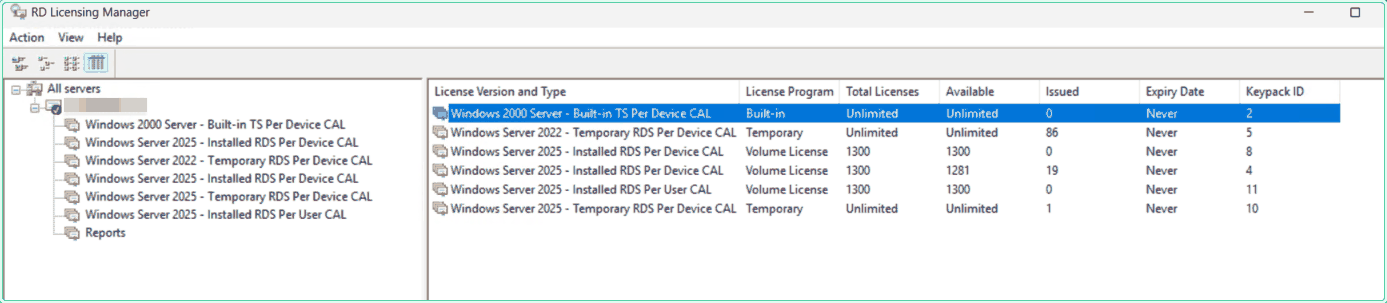
The query most people run leaves out the two properties that matter. This one decodes them, using the values from the class reference.
$keyPackType = @{
    0 = 'Unknown'; 1 = 'Retail'; 2 = 'Volume'; 3 = 'Concurrent'
    4 = 'Temporary'; 5 = 'Open License'; 6 = 'Not supported'
}
$productType = @{ 0 = 'Per Device'; 1 = 'Per User'; 2 = 'Invalid'; 3 = 'Built-in' }

Get-CimInstance -Namespace root\cimv2 -ClassName Win32_TSLicenseKeyPack |
    Sort-Object KeyPackId |
    Select-Object KeyPackId,
        @{ n = 'Program'; e = { $keyPackType[[int]$_.KeyPackType] } },
        @{ n = 'Mode';    e = { $productType[[int]$_.ProductType] } },
        ProductVersion, TypeAndModel, TotalLicenses, IssuedLicenses |
    Format-Table -AutoSize
On the server in question that returns the six rows below. Read them as three groups: one built-in pack that has always been there, two temporary packs the server issued by itself, and three packs somebody installed.
| KeyPackId | Program | Mode | Product version | Total | Issued | What it is |
|---|---|---|---|---|---|---|
| 2 | Built-in | Built-in | Windows 2000 Server | Unlimited | 0 | ships with the role |
| 5 | Temporary | Per Device | Windows Server 2022 | Unlimited | 86 | issued automatically |
| 10 | Temporary | Per Device | Windows Server 2025 | Unlimited | 1 | issued automatically |
| 4 | Volume | Per Device | Windows Server 2025 | 1300 | 19 | the live pack |
| 8 | Volume | Per Device | Windows Server 2025 | 1300 | 0 | the same pack, registered twice |
| 11 | Volume | Per User | Windows Server 2025 | 1300 | 0 | a Per User pack on a Per Device deployment |
TypeAndModel is not enough on its own. Key packs 4, 5, 8 and 10 all report the same string, and two of those are Temporary while two are Volume. The measurement at the end of the safety section shows this on all six rows.
Example 2: find the duplicate mechanically
The problem: on six rows you can spot the pair by eye. On a server that has collected packs over three CAL purchases and an in-place upgrade, you cannot.
The solution: a duplicate is two installed packs agreeing on product version, CAL type and licence count. Group on exactly that and print any group with more than one member.
$packs = Get-CimInstance -Namespace root\cimv2 -ClassName Win32_TSLicenseKeyPack

# KeyPackType 4 is Temporary and ProductType 3 is Built-in. Neither is a duplicate
# of anything, so both are out of scope before the grouping starts.
$packs |
    Where-Object { [int]$_.KeyPackType -ne 4 -and [int]$_.ProductType -ne 3 } |
    Group-Object { '{0} | {1} | {2}' -f $_.ProductVersion, $_.TypeAndModel, $_.TotalLicenses } |
    Where-Object Count -gt 1 |
    ForEach-Object { $_.Group | Sort-Object IssuedLicenses -Descending } |
    Format-Table KeyPackId, ProductVersion, TypeAndModel, TotalLicenses, IssuedLicenses -AutoSize
Run against the six packs from this server, the grouping finds one pair and sorts it so the pack holding the issued licences comes first.
id  type                  total    issued  verdict
--  ----                  -----    ------  -------
4   RDS Per Device CAL    1300     19      keep, it holds the issued licences
8   RDS Per Device CAL    1300     0       redundant copy

duplicate groups found            1
packs in those groups             2
redundant copies                  1

Only ONE pack in the group carries issued licences, and that is the one to keep.
Sorting on IssuedLicenses is what decides it, not the KeyPackId and not the order
the packs happen to come back in.Example 3: decide what is safe to remove
The problem: the obvious rule is that a pack with no issued licences is safe to remove. That rule is wrong on this server, and it is wrong in the direction that costs you.
The solution: three tests before the identifier goes anywhere near the uninstall call. Not built-in, not temporary, and no issued licences.
Get-CimInstance -Namespace root\cimv2 -ClassName Win32_TSLicenseKeyPack |
    Sort-Object KeyPackId |
    Select-Object KeyPackId, TypeAndModel, IssuedLicenses,
        @{ n = 'Removable'; e = {
            if     ([int]$_.ProductType -eq 3) { 'no, built-in'  }
            elseif ([int]$_.KeyPackType -eq 4) { 'no, temporary' }
            elseif ($_.IssuedLicenses -gt 0)   { 'no, in use'    }
            else                               { 'yes'           }
        } } |
Format-Table -AutoSizeKeyPackType 4, not 3, because 3 is Concurrent; and built-in is ProductType 3, not KeyPackType 3. Test the wrong one and your temporary packs quietly become removable. Check both against the class reference rather than against your memory of it.
Against the six packs on this server, the naive rule and the careful one disagree on exactly one row, and the run below shows which.
id  program         type                        issued  naive   careful
--  -------         ----                        ------  -----   -------
2   Built-in        Built-in TS Per Device CAL  0       True    no, built-in
5   Temporary       RDS Per Device CAL          86      False   no, temporary
10  Temporary       RDS Per Device CAL          1       False   no, temporary
8   Volume License  RDS Per Device CAL          0       True    yes
4   Volume License  RDS Per Device CAL          19      False   no, in use
11  Volume License  RDS Per User CAL            0       True    yes

naive says remove           2, 8, 11
careful says remove         8, 11
rows where they differ      1

The two rules disagree on key pack 2, the built-in pack. It reports zero issued
licences forever, so every rule written on IssuedLicenses alone nominates it.

id  TypeAndModel                LicenseProgram  same TypeAndModel as
--  ------------                --------------  --------------------
2   Built-in TS Per Device CAL  Built-in        nothing
5   RDS Per Device CAL          Temporary       4, 8, 10
10  RDS Per Device CAL          Temporary       4, 5, 8
8   RDS Per Device CAL          Volume License  4, 5, 10
4   RDS Per Device CAL          Volume License  5, 8, 10
11  RDS Per User CAL            Volume License  nothing

Key packs 4, 5, 8 and 10 all report the same TypeAndModel string. Two of them are
Volume License and two are Temporary, and nothing in that column says which.
KeyPackType is the property that does, so a query that leaves it out cannot tell
a purchased pack from an automatically issued temporary one.IssuedLicenses alone. It is not a duplicate of anything and it is not yours to remove.
Example 4: remove the pack by its identifier
The problem: you have the identifier and the GUI still has no Delete.
The solution: the documented method takes exactly one argument, and the reference gives its type as uint32. Casting it explicitly is the cheapest way to keep a type mismatch out of the picture.
# The duplicate Per Device pack: 1300 licences, none of them issued.
Invoke-CimMethod -Namespace root\cimv2 -ClassName Win32_TSLicenseKeyPack `
    -MethodName UninstallLicenseKeyPackWithId -Arguments @{ KeyPackId = [uint32]8 }

# The Per User pack that was never part of this deployment.
Invoke-CimMethod -Namespace root\cimv2 -ClassName Win32_TSLicenseKeyPack `
    -MethodName UninstallLicenseKeyPackWithId -Arguments @{ KeyPackId = [uint32]11 }
Each call returns a single property. Zero is success, and the reference page says so in one sentence: if the method succeeds, it returns zero.
ReturnValue PSComputerName
----------- --------------
          0

ReturnValue PSComputerName
----------- --------------
02147749890 WBEM_E_NOT_FOUND, which is what an identifier that no longer exists gives you, 2147749893 WBEM_E_TYPE_MISMATCH, and 2147749896 WBEM_E_INVALID_PARAMETER.
Example 5: verify the removal
The problem: a return value of zero says the call succeeded, not that the server now looks the way you wanted.
The solution: re-run the listing and compare it against the CSV taken in the prerequisites. Two packs should be gone and no issued licence count should have moved.
$before = Import-Csv C:\bat\keypacks-before.csv
$after  = Get-CimInstance -Namespace root\cimv2 -ClassName Win32_TSLicenseKeyPack

# Which identifiers disappeared, and did anything else change its issued count.
Compare-Object $before $after -Property KeyPackId, IssuedLicenses |
    Sort-Object KeyPackId |
    Format-Table KeyPackId, IssuedLicenses, SideIndicator -AutoSize
After the first removal the server reports five key packs, and after the second it reports four. The issued counts on the packs that remain are untouched: 86 on key pack 5, 19 on key pack 4 and 1 on key pack 10, exactly as before.
| KeyPackId | Program | Product version and type | Total | Available | Issued |
|---|---|---|---|---|---|
| 2 | Built-in | Windows 2000 Server, Built-in TS Per Device CAL | Unlimited | Unlimited | 0 |
| 5 | Temporary | Windows Server 2022, RDS Per Device CAL | Unlimited | Unlimited | 86 |
| 4 | Volume | Windows Server 2025, RDS Per Device CAL | 1300 | 1281 | 19 |
| 10 | Temporary | Windows Server 2025, RDS Per Device CAL | Unlimited | Unlimited | 1 |
Remote Desktop Licensing Manager shows the same four rows once the view is refreshed. The duplicate Per Device pack and the Per User pack are gone, and the pack carrying its 19 issued licences is exactly where it was.
Compare-Object result for every identifier except the two you removed is the pass. If any other row appears, something reissued a licence between your two readings, which is normal on a live server and worth a second look rather than alarm.
What the GUI columns are called in WMI
Remote Desktop Licensing Manager and the WMI class show the same six facts under different names, and two of the GUI columns are enumerations rather than text.
| Column in RD Licensing Manager | Property | Notes |
|---|---|---|
| Keypack ID | KeyPackId | the key property, and the only reliable way to address a pack |
| License Version and Type | ProductVersion and TypeAndModel | two properties joined into one column |
| License Program | KeyPackType | an enumeration: 1 Retail, 2 Volume, 4 Temporary, 5 Open License |
| Total Licenses | TotalLicenses | Unlimited in the GUI is the number 4294967295 |
| Available | AvailableLicenses | total minus issued, same sentinel for unlimited |
| Issued | IssuedLicenses | the number that decides whether a pack is safe to remove |
ProductType at all, which is what separates Per Device from Per User and flags the built-in pack as value 3; it is folded into the License Version and Type text instead. And the GUI prints Built-in in its License Program column for that pack, even though Built-in is not one of the documented KeyPackType values. Read the two properties, not the one column.
The wmic equivalent, and why it may not be on your server
The same method is reachable from wmic, and the one-liner is shorter than the PowerShell form.
rem Typed at an elevated CMD prompt. Same method, same single argument.
wmic /namespace:\\root\CIMV2 PATH Win32_TSLicenseKeyPack CALL UninstallLicenseKeyPackWithId 8
On a Windows Server 2025 licence server that line will usually fail before it reaches WMI, because the tool is not there. The Windows Server deprecation list is specific: beginning with Windows Server 2025, WMIC is available as a Feature on Demand, it can be added with DISM /Add-Capability, and it will be removed from Windows in a future release.
On the client side it is already past that point. The Windows deprecated features list records that as of August 2026, WMIC is removed and is no longer available as a Feature on Demand on Windows 11 version 24H2 and above. The deprecation covers the command line tool only; WMI itself is unaffected, which is why the Invoke-CimMethod call keeps working. The site has a longer comparison of wmic and PowerShell if you are still deciding what to do with existing scripts.
Invoke-CimMethod form, which needs nothing installed and is the replacement Microsoft names on the deprecation page.
Boundary 1: there are two uninstall methods and only one can do this
The class exposes UninstallLicenseKeyPack and UninstallLicenseKeyPackWithId. The names suggest the second is a convenience form of the first. It is the other way round: the first cannot express the job at all.
| Method | What it takes | What it can address |
|---|---|---|
UninstallLicenseKeyPack | ProductVersion, ProductType, LicenseCount | any pack sharing those three values |
UninstallLicenseKeyPackWithId | KeyPackId | exactly one pack, because the property is the WMI key |
A duplicate is by definition a pack agreeing with another on version, CAL type and licence count. Those are precisely the three values the first method takes as its address. The run below builds that address for all six packs on this server and counts how many packs each one matches.
id  issued  what UninstallLicenseKeyPack can address        packs that match
--  ------  ----------------------------------------        ----------------
2   0       Windows 2000 Server / Per Device / 4294967295   1
5   86      Windows Server 2022 / Per Device / 4294967295   1
10  1       Windows Server 2025 / Per Device / 4294967295   1
8   0       Windows Server 2025 / Per Device / 1300         2
4   19      Windows Server 2025 / Per Device / 1300         2
11  0       Windows Server 2025 / Per User / 1300           1

ambiguous address             Windows Server 2025 / Per Device / 1300
  matches key packs           4 and 8
  issued licences             4 has 19, 8 has 0

packs addressable without ambiguity   4
packs that are not                    2
unique KeyPackId values               6

KeyPackId is the key property, so it addresses all six. The three attributes
the other method takes cannot separate 4 from 8, and those are the two that
matter: one is empty and one is carrying every issued licence on the server.Boundary 2: the parameter table stopped at Windows Server 2008
There is a second reason to leave the attribute based method alone, and it is visible on its own reference page. Its ProductVersion parameter documents three values: 0 and 1 are listed as not supported, and 2 is Windows Server 2008. There is no documented value for 2012, 2016, 2019, 2022 or 2025.
The class page has moved on without it. ProductVersionID there runs from 2 for Windows Server 2008 up to 7 for Windows Server 2022, and the ProductVersion string property lists values up to “Windows Server 2022”. The install side kept pace too: InstallOpenLicenseKeyPack documents 2, 4, 5 and 6.
The server used here reports “Windows Server 2025”, which appears in none of those tables. That is worth knowing for its own sake: the property is a string, your script should not switch on a fixed list of versions, and a value being absent from the reference does not mean it is absent from your server.
UninstallLicenseKeyPackWithId, which takes an identifier the server itself assigned and therefore has nothing to keep up to date. It is the reason the method has aged well while its sibling has not.
Boundary 3: Unlimited is a number, and the number is 4294967295
TotalLicenses, AvailableLicenses and IssuedLicenses are all documented as uint32. Two of those columns, Total Licenses and Available, print one particular value in Remote Desktop Licensing Manager as the word Unlimited. PowerShell prints it as what it is.
uint32 maximum                    4294967295
same value as 2^32 minus 1        4294967295
what the GUI prints instead       Unlimited

id  total         available     how the GUI shows both columns
--  -----         ---------     ------------------------------
2   4294967295    4294967295    Unlimited / Unlimited
5   4294967295    4294967295    Unlimited / Unlimited
10  4294967295    4294967295    Unlimited / Unlimited
8   1300          1300          1300 / 1300
4   1300          1281          1300 / 1281
11  1300          1300          1300 / 1300

rows the GUI calls Unlimited      3
rows with a real count            3

A script that sums TotalLicenses across every pack to report capacity adds three
copies of 4294967295 to 3900 and reports roughly 12.9 billion CALs. Filter the
sentinel out before you add anything up.
naive sum of TotalLicenses        12884905785
sum ignoring the sentinel 3900Boundary 4: removing a pack that has issued licences
The method does not ask whether the pack is in use, and neither does anything in front of it. Remove key pack 4 on this server rather than key pack 8 and 19 issued Per Device licences go with it.
Per Device and Per User behave differently here and it is worth knowing which you are in. A Per Device CAL is issued to a device and tracked, so removing the pack that holds those records is a real loss of state. Per User CAL tracking is not enforced the same way, which softens the consequence but does not make it a good idea.
Boundary 5: what removing a pack does not fix
Removing a redundant pack tidies the console and removes a row that could be picked by mistake later. It does not re-point licences that have already been issued, and it does not change which pack the server chooses next.
The symptom that brings most people here is the neighbouring one: after an in-place upgrade, new licences keep being recorded against an old key pack that shows zero installed licences, while the newly installed pack sits untouched. An accepted answer on a Microsoft Q and A thread describing exactly that says the licensing database retains legacy key packs and continues to associate new assignments with the last active pack, and that a rebuild is what clears it.
The alternative everyone recommends, and what it costs
The standard answer to anything wrong in the licensing database is to rebuild it: stop the Remote Desktop Licensing service, remove or rename the database directory, start the service so a fresh one is created, reactivate the server and install every CAL pack again. That it is the standard answer is itself the evidence for the premise of this article: Microsoft documents how to install CALs on a licence server and how to activate one, publishes no companion page for removing a key pack, and the advice given for a legacy pack that will not go away is to rebuild the database rather than to click anything in the console.
It is the right tool for a corrupted database or a legacy pack that keeps claiming new assignments. It is the wrong tool for one redundant row, because of what it takes with it: every issued licence record, the server activation, and every CAL pack you then have to reinstall from its original code. On the server in this article that would have meant re-registering 1300 Per Device CALs and losing 106 issued licence records to delete a single empty pack.
| Remove one key pack by identifier | Rebuild the licensing database | |
|---|---|---|
| What it touches | one key pack | the whole database |
| Issued licences | kept, except on the pack removed | all lost |
| Reactivation | not needed | required |
| Licence codes needed | only if you have to undo it | every pack, every time |
| Service restart | not needed | required |
| Fixes a corrupted database | no | yes |
Hidden gems
RemoveLicensesWithIdCountremoves licences without removing the pack. It takes an identifier and a count, so an over-installed pack can be trimmed rather than deleted. It is the right method when the pack is correct and only the quantity is wrong.KeyPackIdcarries the key qualifier, and that is a fact with consequences. A key property identifies exactly one instance of the class. That is the whole reason the identifier based method is deterministic and the attribute based one cannot be, and it is stated on the class reference rather than being something you have to infer.- A busy temporary pack is worth a second look. Key pack 5 on this server has issued 86 temporary Windows Server 2022 CALs while the permanent Windows Server 2025 pack has issued 19. A temporary pack doing most of the work raises a question about CAL versions against session host versions, which is a different investigation from this one but a more urgent one.
- Export before and after, every time. An
Export-Csvof the class costs one line and turns a hopeful look at the console into aCompare-Objectyou can put in a change record. It is also the only note of what the identifiers were, which matters because they are not reused predictably. - The built-in pack is not a bug. Key pack 2, Windows 2000 Server Built-in TS Per Device CAL, ships with the role and reports unlimited licences and zero issued forever. Every clean licence server has one.
Where this matters
- The same licence code entered twice. Usually during testing, or by two administrators who each thought the other had not done it. The second pack is inert and permanent until something removes it.
- A CAL pack installed in the wrong mode. Per User CALs registered on a Per Device deployment sit at zero issued and make the console harder to read for everyone who comes after you.
- A licence count that does not match the purchase order. Two packs of 1300 read as 2600 installed CALs in any report that sums the column, which is an uncomfortable number to have in a compliance conversation.
- A server carried through an in-place upgrade. Legacy packs accumulate across versions and the console gets steadily less legible, which is exactly when someone removes the wrong row.
- Handing the deployment to someone else. Six rows where four belong is a question you will be asked, and the honest answer takes longer than the fix.
Tips and limitations
- Run it on the licence server, from an elevated session. The class reference requires membership of the Administrators group to use the class at all.
- Cast the argument.
KeyPackIdis documented asuint32, and being explicit about it costs nothing. - Never pick the pack to keep by identifier order. Pick it by
IssuedLicenses, which is the only column that reflects reality. - The enumerations are worth pinning to the reference rather than to memory:
KeyPackTypeis 1 Retail, 2 Volume, 3 Concurrent, 4 Temporary, 5 Open License, andProductTypeis 0 Per Device, 1 Per User, 3 Built-in. - Removing a pack is immediate and there is no undo on the server. The undo is the licensing wizard plus the original code.
wmicis a Feature on Demand on Windows Server 2025 and removed from Windows 11 24H2 and above as of August 2026. Write new work againstInvoke-CimMethod.- This removes a key pack. It does not repair a corrupted licensing database, reactivate a server, or change which pack new licences are issued against.
Official documentation
- Win32_TSLicenseKeyPack class | Microsoft Learn
- UninstallLicenseKeyPackWithId method | Microsoft Learn
- UninstallLicenseKeyPack method | Microsoft Learn
- RemoveLicensesWithIdCount method | Microsoft Learn
- Remote Desktop Services WMI provider error codes | Microsoft Learn
- Install Remote Desktop Services client access licenses | Microsoft Learn
- Activate the Remote Desktop Services license server | Microsoft Learn
- Cannot connect to RDS because no RD Licensing servers are available | Microsoft Learn
- Remote Desktop Licensing Service may not start and event ID 623 may be logged | Microsoft Learn
- Features removed or no longer developed in Windows Server | Microsoft Learn
- Deprecated features for Windows client | Microsoft Learn
- WMIC: WMI command-line utility | Microsoft Learn
- wmic: Windows Commands | Microsoft Learn
Related tools
- Event Log Analyzer: the licensing service and its database report trouble through the event log, including the ESENT error in the Microsoft article on the service failing to start.
Related guides
- Reading RDP sessions with quser and qwinsta: who is actually connected to the session hosts these CALs are issued for.
- The RDP security warning in the April 2026 Windows update: the other thing that quietly changes under a working Remote Desktop deployment.
- Choosing between wmic and PowerShell: what to do with the scripts that still call the deprecated tool.
- Reading and setting services with Get-Service and Set-Service: the Remote Desktop Licensing service, and stopping it safely if you do rebuild.
- Backing up a server with wbadmin: worth running before anything touches a licensing database.
- Reading Windows event logs with Get-WinEvent: how to filter for what the licensing service recorded.
Five cheat sheets, one PDF
Subnet masks, PowerShell, Linux commands, HTTP status codes and the ESXi command line - one page each, free to keep. Leave an address and it arrives in a minute.